
Need to give ₱42 change? Use two ₱20 coins and two ₱1 coins. That fits Lucia’s Day 1 ₱58 order if the game shows a ₱100 payment. Always subtract your current cost from your current paid amount.
A real order: ₱58 total, with a conditional ₱100 payment
The checked Day 1 story file gives Lucia this order:
- Kornbep corned beef ×1
- 1 × ₱40 = ₱40
- Manok na Manok soup noodles ×2
- 2 × ₱9 = ₱18
- Order total
- ₱40 + ₱18 = ₱58
If the displayed payment is ₱100, then ₱100 − ₱58 = ₱42 change. Give ₱20 + ₱20 + ₱1 + ₱1 = ₱42. Payment is generated by the game, so the order does not guarantee a ₱100 note. If your paid amount differs, calculate again.
This is an order and price combination verified in the official game files, with a conditional payment example. It is not a transcript of a transaction we completed in play.
Which build was checked?
Prices, item placement and desktop interaction rules on this page were checked in the public files of the official web build on . This was a static file inspection, not a completed playthrough or a touchscreen test. The checked game-data file has a SHA-256 beginning 9857845d982e. The separately hosted game on this portal may use a different build; follow its current prompts.
Which coins and bills are in the cash drawer?
The checked cash-drawer scene arranges these denominations from left to right:
- Lower row: coins
- ₱1 · ₱5 · ₱10 · ₱20
- Upper row: bills
- ₱50 · ₱100 · ₱500 · ₱1,000
These are Philippine pesos, not centavos. A ₱42 amount does not require a single ₱42 piece: combine the available denominations until their total matches the required change.
How to serve the order and give change on desktop
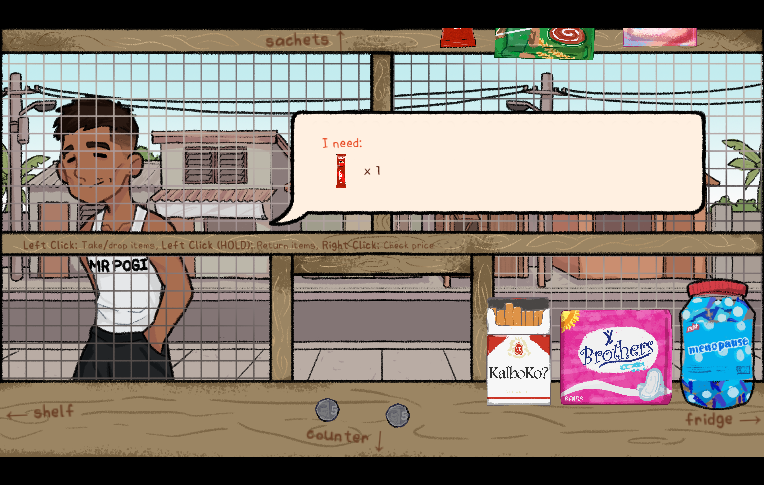
- Check the order’s products and quantities. Take each product with a short left click on its dispenser. While holding it, hold the right mouse button to see its unit price; release to see the quantity again. Use the item and coffee-location guide if you cannot find a product.
- Drop the requested items into the customer’s item-receiving area. The checked receiver requires matching products and quantities. A short click on an open location drops what you are holding.
- Follow the current prompt for change. In both checked opening orders, the logic handles payment, then requires the products, then asks for any positive change. The visible paid/cost prompt is created at that change stage. This does not mean you must manually collect money before serving.
- Subtract cost from paid. For the ₱100 / ₱58 example, use two ₱20 coins and two ₱1 coins from the lower row.
- Take the required cash from the drawer and drop it into the customer’s cash-receiving area. Keep the value you offer at or below the change still owed: the checked cash receiver rejects a piece or held stack worth more than the remainder. It advances once the correct total has been accepted.
If payment exactly equals the cost, the checked logic skips waiting for positive change. These controls were read from the desktop files; phone players should follow the separate official touch controls. Later story scenes and the portal’s mirror may differ.
How much change for Junjun’s first coffee?
The opening request is one NESKAPE coffee stick at ₱10. If your game shows paid ₱20 and cost ₱10, give ₱10; an exact ₱10 payment needs no change. Do not substitute a fixed payment from a guide: the amount can vary. Junjun’s earlier spoken ₱50 debt is dialogue, not the coffee’s configured price.
Use the change calculator beside the game
- Open the change calculator in a separate tab. Leave your active game tab in place.
- Enter the entire order total and the payment received in pesos. Up to two decimal places represent centavos.
- Read whether the result is change, exact payment or a shortfall. Check the figures again if the result looks surprising.
- Return to the game and follow its current cash prompt. The calculator does not press game buttons, advance a customer or save your progress.
The calculator performs arithmetic from the values you enter. It cannot verify an item price, know whether a customer has paid or inspect the embedded game.
Extra arithmetic practice: five invented examples
Only these extra exercises use made-up prices and payments. They are not a Narinig Mo Ba? product price list. Centavos in one exercise demonstrate calculator arithmetic; they do not claim that the game uses fractional prices.
One practice item
Made-up practice prices: 1 × ₱35.00 = ₱35.00 total. Practice payment: ₱50.00.
Change: ₱50.00 − ₱35.00 = ₱15.00.
A practice order with two quantities
Made-up practice prices: 2 × ₱25.00 + 1 × ₱18.00 = ₱68.00 total. Practice payment: ₱100.00.
Change: ₱100.00 − ₱68.00 = ₱32.00.
A practice amount with centavos
Made-up practice prices: 1 × ₱25.50 = ₱25.50 total. Practice payment: ₱50.00.
Change: ₱50.00 − ₱25.50 = ₱24.50.
Exact payment practice
Made-up practice prices: 1 × ₱42.00 = ₱42.00 total. Practice payment: ₱42.00.
Exact payment: ₱42.00 − ₱42.00 = ₱0.00 change.
Underpayment practice
Made-up practice prices: 1 × ₱50.00 = ₱50.00 total. Practice payment: ₱40.00.
The payment is short by ₱10.00. There is no change to give: ₱50.00 − ₱40.00 = ₱10.00 still owed.
Avoid common counting mistakes
- Forgetting a second item
- Multiply the unit price by the requested quantity before adding the next product. Use the order-board counts described in the item guide.
- Treating a shortfall as change
- If payment is below the total, the difference is still owed. Do not return the absolute value of a negative result as change.
- Confusing total and payment
- The total is the price of the order. Payment is what the customer gives. Keep those fields in that order when using the calculator.
- Refreshing to check a number
- Keep the game open and do the arithmetic in a separate tab. A refresh can lose progress and is not needed for a calculation.
When the calculation is right but the game will not continue
Compare the requested products and quantities, then read the current interaction prompt. This guide cannot confirm an untested completion condition for that scene. For controls, return to the first-shift guide; for clicks, sound or loading failures, use browser troubleshooting. Phone players should choose the official touch release.
Sources checked : official game release and the creators’ mobile announcement.